

From Google Sheets to WhatsApp: Smart Messaging for Modern Business

Written by
WappCloud Team

Post date
04 June 2026
As a business, WhatsApp is one of the most powerful and rewarding communication platforms you can leverage. With billions of active users and engagement rates that far outperform traditional email, it offers a direct line to your customers like nothing else.
But here's the reality: as your business scales, managing WhatsApp manually becomes a serious bottleneck. Sending individual messages, tracking contacts, and maintaining consistency across thousands of conversations is time-consuming and error-prone.
This is precisely where WappCloud's WhatsApp Google Sheets integration becomes a game-changer. In this guide, we'll explore how you can send WhatsApp messages directly from Google Sheets, why WappCloud is the ideal solution, and the real-world business impact you can expect.
Is It Possible to Send WhatsApp Messages from Google Sheets?
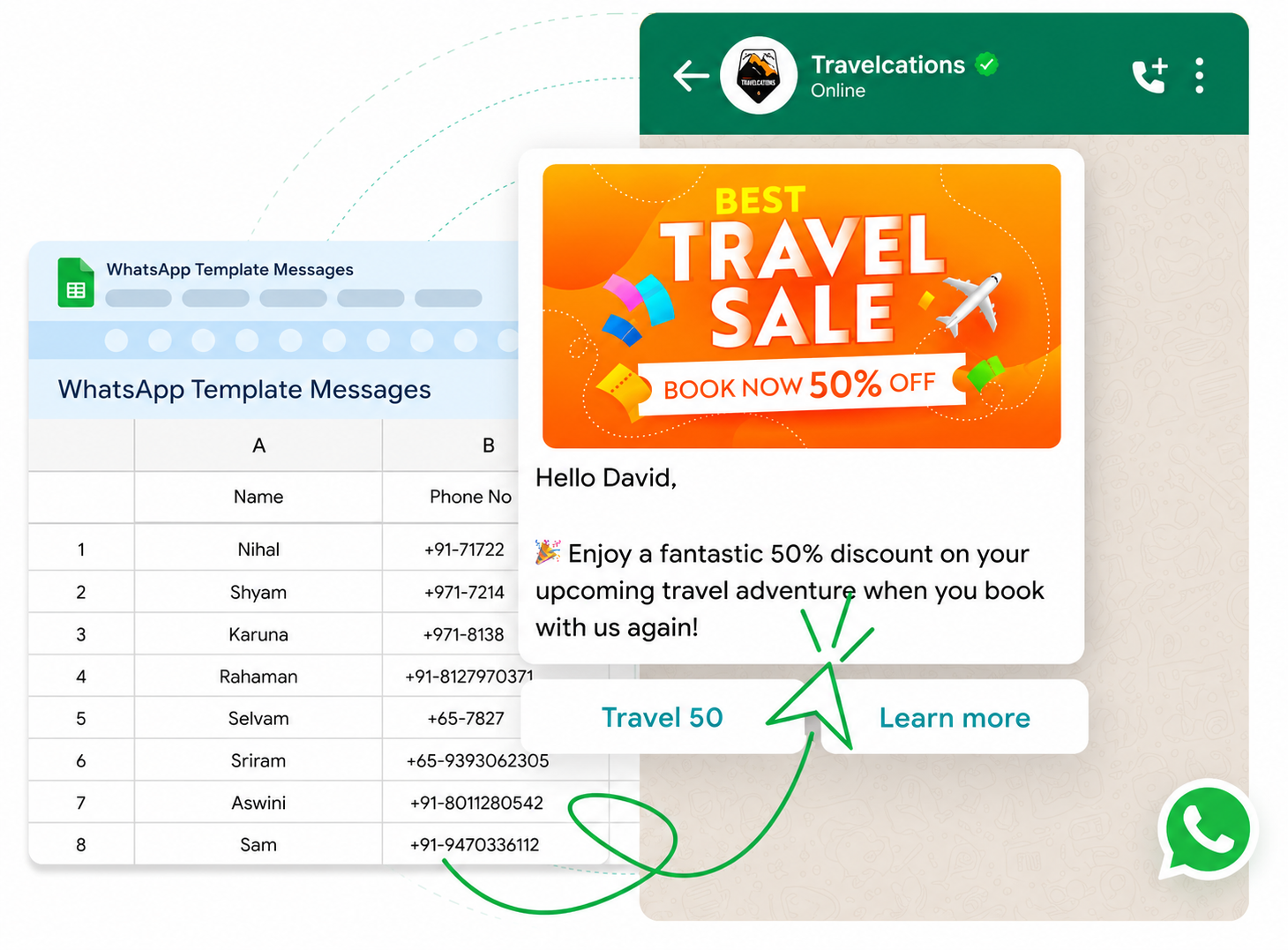
Yes — and it's simpler than you might think. WappCloud makes it possible to connect Google Sheets to WhatsApp, enabling a more streamlined and automated approach to business communication. Here are the three ways you can do it:
1. WappCloud's Google Sheets Add-on
The easiest and most recommended method is WappCloud's dedicated Google Sheets Add-on. Since WappCloud is a WhatsApp Business API solution provider, integrating with Google Sheets is seamless and straightforward. No coding, no complex configuration. Just install, connect, and go.
2. Using Third-Party Integration Platforms
You can also connect Google Sheets to WhatsApp via WappCloud using popular automation platforms such as Zapier or Make (formerly Integromat).
Zapier offers a broad range of integrations that let you create automated workflows — called Zaps — between Google Sheets and WappCloud's WhatsApp API. Make goes even further, allowing you to build complex multi-step Scenarios with conditional logic, filters, and branching workflows.
Both tools are no-code friendly and ideal for teams already working within automation ecosystems.
3. Using Python and WappCloud's API
For teams that prefer a code-first approach, Python combined with WappCloud's WhatsApp API offers maximum flexibility and control. Using libraries such as gspread to interact with the Google Sheets API, you can read data from your spreadsheets and trigger WhatsApp messages programmatically.
By writing a Python script that combines the Google Sheets API and WappCloud's WhatsApp API, you can fully automate the entire messaging workflow — including scheduling, personalisation, error handling, and delivery tracking.
This approach is best suited for developers and engineering teams building production-grade messaging pipelines.
Why Choose WappCloud's Google Sheets Plugin?
WappCloud's Google Sheets Plugin is purpose-built for businesses that rely on WhatsApp as a core communication channel. Here's why it stands out from the rest:
1. Streamline Your Workflow
Manually sending WhatsApp messages from a spreadsheet is time-consuming — especially when you're dealing with hundreds or thousands of contacts. WappCloud automates this entire process, enabling you to send messages directly from your spreadsheet with just a few clicks. This automation frees your team from repetitive tasks and lets them focus on higher-value activities that actually grow your business.
2. Boost Accuracy and Efficiency
Manual messaging is prone to human error — wrong recipients, missing information, inconsistent formatting. WappCloud eliminates these risks by reading data directly from your Google Sheet and applying it precisely to every message. By removing the need for repeated manual data entry, WappCloud ensures every message is accurate, consistent, and professional — whether you're sending 10 messages or 10,000.
3. Effortless Integration — No Learning Curve
One of WappCloud's most significant advantages is how naturally it fits into your existing workflow. The integration lives right inside Google Sheets — a tool your team already uses every day. There's no new software to install, no new interface to learn, and no technical expertise required. WappCloud bypasses complex API configurations entirely, giving you a user-friendly solution that's ready to use from day one.
Top Use Cases of Google Sheets to WhatsApp Integration
WappCloud's Google Sheets integration unlocks a wide range of powerful business applications. Here are the most impactful use cases:
1. Automated Notifications and Alerts
Timely communication is one of the primary reasons businesses turn to WhatsApp — and combining it with Google Sheets through WappCloud takes this to the next level. Every time a new row is added to your sheet, WappCloud can automatically trigger a WhatsApp message to the relevant customer.
Practical examples include:
- Instant order confirmation messages the moment a purchase is logged
- Appointment reminders sent 24 hours and 1 hour before scheduled time
- Payment due date reminders and overdue notices based on invoice data
- Delivery and shipment status notifications triggered by status column changes
All of this happens automatically, without your team needing to send a single message manually.
2. Customer Support and Service
WappCloud enables your support team to keep customers informed at every stage of their service journey — automatically and accurately. By connecting your support data in Google Sheets to WhatsApp, you can:
- Update customers on the status of support tickets they've opened
- Send automated feedback requests after issue resolution or purchase completion
- Provide real-time order, delivery, and shipment updates without manual follow-up
- Notify customers when their case has been escalated or resolved
The result: faster response times, happier customers, and a support team that can handle more cases with less effort.
3. Promotions and Marketing Campaigns
WhatsApp has become one of the most effective channels for promotional messaging, with open rates exceeding 90%. WappCloud's Google Sheets integration makes it easy to run personalised, large-scale marketing campaigns directly from your spreadsheet data.
Use cases include:
- Personalised event invitations tailored to each contact in your sheet
- Flash sale alerts and exclusive discount codes sent to segmented customer lists
- New product launch announcements with rich media attachments
- Regular newsletters and brand updates distributed to opted-in subscribers
Every message feels individually crafted — even when you're sending thousands at once.
In today's fast-moving business environment, efficient and personalised communication is no longer optional — it's a competitive necessity. WappCloud's Google Sheets Plugin offers a powerful, accessible solution for automating WhatsApp messaging at scale.
By combining the familiarity of Google Sheets with the reach and engagement of WhatsApp, WappCloud helps your business:
- Save hours of manual messaging time every week
- Eliminate costly errors and ensure message accuracy
- Deliver timely, personalised communication to every customer
- Scale your messaging without scaling your team
Whether you're running a small business managing a growing contact list or a large enterprise orchestrating complex customer journeys, WappCloud makes the entire process smoother, smarter, and more productive.
Embrace the WappCloud integration today and transform the way your business communicates on WhatsApp.