

WhatsApp API Pricing & Cost of WhatsApp Marketing in 2026

Written by
WappCloud Team

Post date
28 July 2026
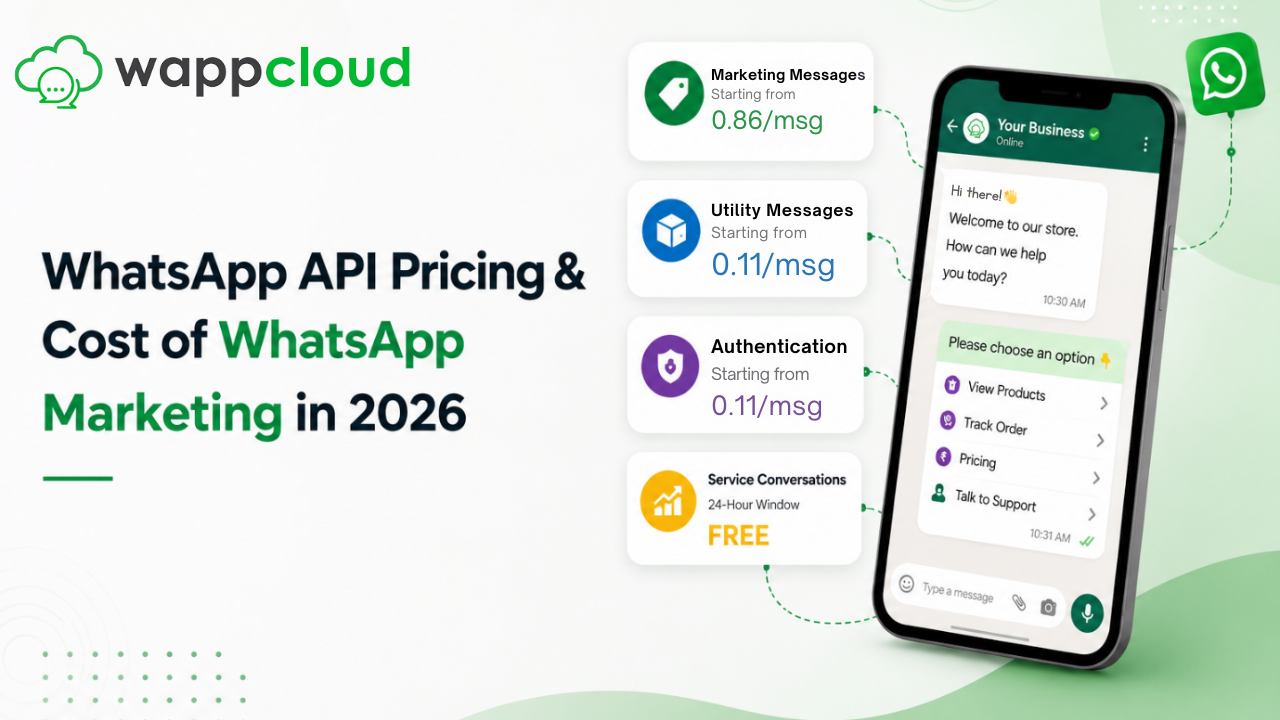
WhatsApp Business API has become one of the most reliable ways for businesses to reach customers directly — but most teams get their budgeting wrong because they don't understand how the pricing actually works. In this guide, we'll break down exactly what you pay for, how charges change by message type and country, and how to work out a realistic monthly cost for your WhatsApp marketing.
We'll also cover a few practical ways to bring your API costs down without cutting back on how often you reach your customers.
The Two Costs Hiding Inside Every WhatsApp Bill
Most businesses assume WhatsApp API pricing is a single number. In reality, your monthly spend is made up of two completely separate charges — the fee for the software you use to run the API, and the fee WhatsApp itself charges for delivering messages. Understanding both is the only way to estimate your true WhatsApp marketing budget.
1. The Platform Fee
Meta only builds and maintains the WhatsApp Business API — the raw connection. It doesn't give you an interface to send broadcasts, manage contacts, build chatbots, schedule campaigns, or automate replies. For that, you need a platform layered on top of the API. You can build this layer in-house, which usually takes months of development time, or you can use a ready-made platform like WappCloud and start messaging customers from day one. This is the piece you pay us for — a small monthly or annual subscription that gives you full access to the platform. You can see our current plans on the WappCloud pricing page.
2. WhatsApp's Own API Charges
Separately, WhatsApp charges on a per-delivered-message basis for template messages — the pre-approved messages businesses use to start a conversation with a customer. Every template has to be submitted to WhatsApp for approval, and the category it's approved under decides how it gets priced.
What Actually Decides Your Per-Message Cost
Four factors determine what you're charged each time a message goes out:
- The type of message you're sending — marketing, utility, authentication, or service.
- Whether it falls inside a free messaging window.
- The country the recipient is in.
- Your monthly messaging volume, which can unlock lower volume-tier rates.
Here's how each one plays out.
Message Types
WhatsApp splits templates into four categories, and each one is priced differently:
- Marketing — promotional templates like offers, launches, or cart reminders. Charged on every delivery unless it lands inside a Free Entry Point window.
- Utility — transactional templates such as order confirmations or delivery updates. Charged unless sent inside a customer service window or Free Entry Point window.
- Authentication — OTP and identity-verification templates used during login or sign-up.
- Service — free-form replies sent during an open customer service window. Since November 2024, WhatsApp allows unlimited service messages at no charge, as long as the 24-hour window with that customer is still open.
Here's the same breakdown as a quick-reference table:
| Message Type | When You Pay | When It's Free |
|---|---|---|
| Marketing | Every time a marketing template is delivered | During an active Free Entry Point window |
| Utility | When sent outside the customer service or Free Entry Point window | Inside a customer service or Free Entry Point window |
| Authentication | Every time an OTP/authentication template is delivered | During an active Free Entry Point window |
| Service | Never charged | Always free within a 24-hour customer service window |
Messaging Windows
WhatsApp uses two types of "free windows" that determine whether a message costs you anything:
- Customer Service Window (CSW) — a 24-hour timer that starts (or resets) the moment a customer messages your business. Inside this window, every message type is free except marketing templates.
- Free Entry Point (FEP) Window — opens when a customer reaches out through specific entry points, such as a Click-to-WhatsApp ad or a Facebook Page button. Replying within 24 hours keeps the conversation free.
Recipient's Country
WhatsApp's rates also change based on the recipient's country code, reflecting local market conditions. The same marketing template can cost noticeably less to deliver in India than it would in the UK, the US, or most of Europe — so your audience mix directly affects your total spend.
Putting It All Together
Once you know both pieces, calculating your real WhatsApp cost is straightforward:
Total WhatsApp Cost = Platform Subscription Fee + WhatsApp API Delivery Charges
Why Some WhatsApp Platforms Quietly Cost You More
WhatsApp sets the official API rates — but there are two ways businesses end up paying them: directly to Meta, or routed through their platform provider.
Many popular WhatsApp API platforms require you to prepay for credits and then consume those credits per message. This wallet-style billing gives them room to add a markup — commonly anywhere from 10% to 25% — on top of Meta's official rate. It's a widespread practice, but it quietly inflates your marketing budget without adding any real value.
WappCloud works differently. We never bill you for WhatsApp API usage. Instead, you connect your own payment method directly with Meta, and Meta bills your API charges straight through their portal. That means zero markup on official WhatsApp rates — every rupee you save can go straight back into reaching more customers.
Ways to Bring Down Your WhatsApp API Costs in 2026
Since WhatsApp now charges per message, cutting costs isn't about sending less — it's about sending smarter. A few habits make a real difference:
- Get customers to message you first — Click-to-WhatsApp ads, QR codes, and website chat widgets all open a free customer service window, so your replies don't get billed.
- Make the most of free service messages — resolve customer questions with chatbots or auto-replies inside the 24-hour window instead of sending a fresh paid template.
- Run targeted campaigns, not broadcasts — segment your contact list with a CRM so promotional templates go only to people likely to convert, instead of your entire list.
- Pick a platform with transparent pricing — a hidden markup on every message adds up fast over a full year of campaigns.
Wrapping Up
Getting WhatsApp API pricing right comes down to two things: using the messaging windows and message types strategically, and choosing a platform that doesn't quietly mark up your API spend.
That's exactly what WappCloud is built for. You get full WhatsApp Business API access with zero markup on Meta's official rates, plus a complete toolkit to run your WhatsApp marketing end to end:
Send broadcasts to thousands of opted-in contacts in one go.
Trigger transactional messages for orders, form submissions, and callback requests straight from your website.
Capture leads from Facebook and Instagram ads directly into your contact list.
Run drip campaigns to onboard new users and re-engage inactive contacts.
Use WhatsApp Flows to collect information through guided, in-chat forms.
Connect your CRM, e-commerce store, or other tools through our REST API.
Track delivery, open rates, and engagement in real time.
Set up chatbots for round-the-clock FAQ and support coverage.
Manage every conversation from one shared team inbox.
If you want to manage your WhatsApp marketing costs without cutting corners on results, WappCloud is built to help you do exactly that.